
The starter world — what a new project opens to
A fresh vgai project opens to a polished, neutral scene — a procedural daylight sky, a construction grid on soft ground, a single focal object under a real light rig, framed by an orbit camera. Not a grey void, and deliberately not a game: the starter ships no character, no input map, and no mechanics, because a new game should not inherit a genre before its brief supplies one. Rich playable starts live in the example projects instead.
Roots, not one scene
Section titled “Roots, not one scene”The starter’s vgai.project.json declares its surfaces as roots that mount side by side — a
three root whose document is src/world.tsx, and a dev-only dom root for the in-game dev
menu:
"roots": [ { "id": "world", "adapter": "three", "entry": "src/world.tsx" }, { "id": "dev-menu", "adapter": "dom", "entry": "src/dev-menu.tsx", "dev": true }]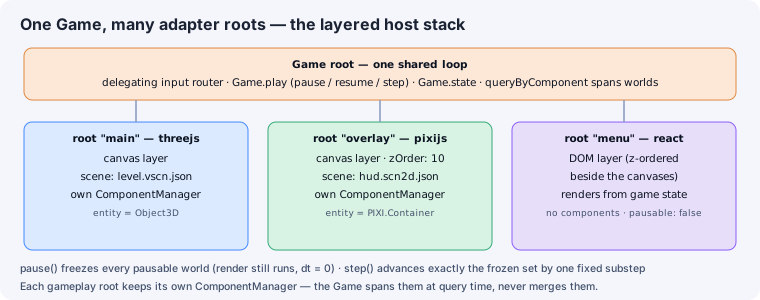
Multi-root is the default shape of a game here, not an advanced feature you graduate into. When
your game grows a HUD, it joins this list as an ordinary dom root.
Entrypoint and scene
Section titled “Entrypoint and scene”src/world.tsx is the thin root entrypoint — there is no .json scene format in between. It
mounts persistent renderer and development policy, then composes the active complete scene:
- Render finish — ACES filmic tonemapping and soft shadows applied to the host renderer, and restored when the world unmounts.
- Invisible dev residents — bridges that publish the game’s declared stats/cheats and the resident QA bot’s controls as ordinary providers and commands. They render nothing.
<MainScene>— the complete replaceable composition insrc/scenes/MainScene.tsx.
MainScene owns the neutral environment, a camera and orbit controls, and one placeable focal
prefab. The editor reads these source-owned component instances as the hierarchy and writes
literal prop edits back into the same lines.
Scenes, components, and prefabs — the taxonomy the folders teach
Section titled “Scenes, components, and prefabs — the taxonomy the folders teach”The starter’s folders state what each file is, and the split is the point:
src/scenes/holds complete replaceable compositions. Each file ends inScene.tsx; a scene is not a Content prefab and does not have a story.src/prefabs/holds PLACEABLE assets — the units a designer selects, drops, or duplicates as one piece. Each has a colocated story that registers it in the editor’s Content tab. The starter ships one:HeroBox, the neutral focal object, meant to be replaced the moment your game finds its subject.src/components/holds extracted supporting implementation that is not independently placeable. The starter’sGroundowns both its Surface and its single-node Construction Grid; those inseparable parts do not become misleading Content entries.
Nothing here is special-cased
Section titled “Nothing here is special-cased”The starter is an ordinary project. Restyle the HeroBox, swap the sky, or replace MainScene
with your own composition — none of it is engine-privileged content, and “blank” is simply
deleting the sample JSX.
In the browser editor, opening a project with empty storage seeds this same starter into OPFS after you explicitly choose to create a game. A fresh visit that doesn’t ask for a new project writes nothing.
See also
Section titled “See also”- Worlds and roots — the ontology behind that manifest.
- Source is truth — how inspector edits reach
world.tsx.