
Project lifecycle: upgrade & deploy
Two vgai verbs cover a project’s life after scaffolding (for scaffolding itself,
see Scaffold a project).
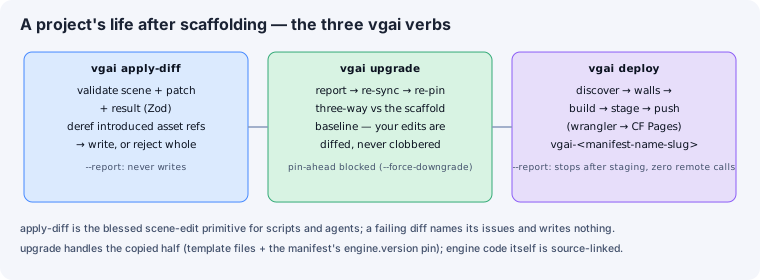
Editing a world: there is no scene-edit verb
Section titled “Editing a world: there is no scene-edit verb”There is deliberately no “scene-edit primitive” and no JSON patch operation. A three root is authored as TSX/R3F source and that source is the document, so the operation a script or agent wants is an ordinary source edit — there is no JSON document to patch, and a patch primitive over TypeScript would be a worse editor than the editor.
An unsupported scene-edit verb fails with that explanation rather than silently
doing nothing.
To drive or read a running game from a script, the general door is
vgai eval '<js>'.
vgai upgrade — re-sync a project against the engine checkout
Section titled “vgai upgrade — re-sync a project against the engine checkout”Reports, re-syncs, and re-pins a scaffolded project against the engine checkout it
lives beside, using the scaffold baseline (.vgai/scaffold-baseline.json) for
three-way comparison — your local edits to template files are surfaced as diffs,
never clobbered.
npm run vgai -- upgrade # report + re-sync + re-pinnpm run vgai -- upgrade --report # report only, never writesvgai deploy — ship to Cloudflare Pages
Section titled “vgai deploy — ship to Cloudflare Pages”Discovers the project, runs the pre-flight walls, builds, stages, and pushes the
static bundle to Cloudflare Pages with wrangler:
npm run vgai -- deploy # full pipelinenpm run vgai -- deploy --report # stop after staging — zero remote callsnpm run vgai -- deploy --project my-game # explicit Pages project nameThe default Pages project name is vgai-<slug of the manifest name>.
See also
Section titled “See also”- CLI, SDK & scaffolding — the editor-control verbs.
- Validate & schema tooling — the validation the same pipeline runs.