
Hot reload, storage & builds
Hot reload
Section titled “Hot reload”npm run dev opens the editor through Vite. Source edits use the owning ecosystem’s normal
module and React-refresh behavior: TSX components re-render, and React preserves hook state
when the component boundary remains compatible. A remount starts a new project mount epoch so
all roots that share a project module still receive one common module instance.
The editor never swaps an engine-specific behavior prototype or compiles a second scene model. When an edit changes root structure or invalidates a module boundary, the honest result is a remount rather than an attempt to preserve incompatible state.
Storage backends & the browser-first editor
Section titled “Storage backends & the browser-first editor”The editor reads/writes through a StorageBackend (packages/editor/src/storage/): Opfs
(browser OPFS), Fsa (File System Access API — a real on-disk folder), Mem (tests), and
Http (the server-first /__editor/* backend). Selecting OPFS/FSA gives a browser-first,
server-less editor — npm run build:web produces a static editor that needs no Node.
Validation & generation
Section titled “Validation & generation”| Command | Does |
|---|---|
npm run validate-assets | content-parse .mat/.inputmap assets |
npm run generate-schema | Zod → JSON Schema (manifest/.inputmap/.mat) |
npm run generate-engine-manifest | generated engine API reference |
Building & publishing
Section titled “Building & publishing”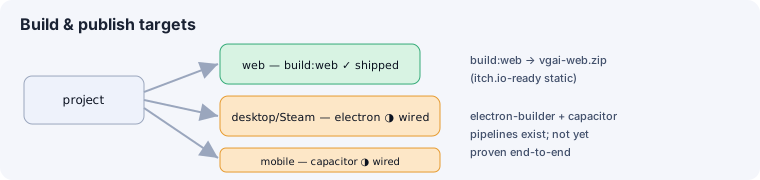
- Web (shipped):
npm run build:webproduces a static bundle zipped tovgai-web.zip(itch.io-ready). The in-editor Build panel (/__editor/export) runs this for you.
See also
Section titled “See also”- CLI, SDK & scaffolding · Hot reload concept in the runtime
- Editor: build & export — the in-editor Build panel.