
Rendering, cameras & meshes
vgai’s primary render surface is Three.js 3D over WebGL. There’s no abstraction layer —
ctx.scene, ctx.camera, and ctx.composer are the real Three.js objects.
The renderer
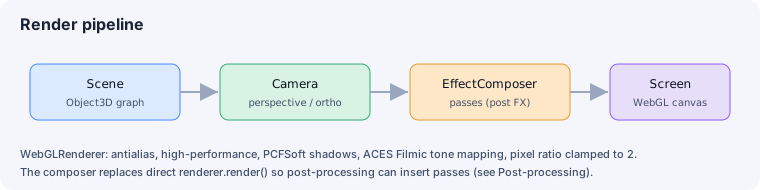
Section titled “The renderer”Setup (packages/engine/src/setup/setup-renderer.ts) creates a THREE.WebGLRenderer with:
antialias: true,powerPreference: 'high-performance';- PCF soft shadow maps (
shadowMap.type = PCFSoftShadowMap, enabled); - ACES Filmic tone mapping with exposure
1.0; - pixel ratio clamped to
Math.min(devicePixelRatio, 2).
Rendering goes through an EffectComposer rather than a bare renderer.render(), so the
post-processing stack can insert passes.
Cameras
Section titled “Cameras”The camera schema (packages/engine/src/asset-formats/camera.ts) supports two projections:
type | Key fields |
|---|---|
perspective | fov (vertical FOV in degrees), near, far |
orthographic | orthoSize (half-height of the frustum), near, far |
Both accept optional width / height (defaulting to the viewport). Camera precedence is
editor viewport < scene-defined camera < camera-owning world code — a component can drive
the camera each frame (follow cams, orbit cams).
Mesh geometries
Section titled “Mesh geometries”The mesh schema (packages/engine/src/asset-formats/mesh.ts) builds geometry from a type:
type | args |
|---|---|
box | [w, h, d] |
sphere | [radius] |
plane | [w, h] |
cylinder | [rTop, rBot, h] |
capsule | [radius, length] |
gltf | (none — set src to a .gltf/.glb) |
Beyond primitives, use a GLB for project-owned geometry such as terrain. For repeated geometry,
use THREE.InstancedMesh with native Matrix4 transforms in source, or bake the standard glTF
EXT_mesh_gpu_instancing extension. See Geometry: instancing & terrain.
A gltf mesh can also declare lod — an array of { distance, node } levels that
build a THREE.LOD, swapping detail by camera distance (each node references a sub-node
of the same src glTF, geometry shared). The scene-level environment.rendering.lod toggle
is the master gate: turn it off and only the closest level renders. LOD is gltf-only and
can’t combine with node.
See also
Section titled “See also”- Materials — how surfaces are shaded.
- Lighting & environment — lights and shadows.
- Post-processing — the composer’s effect passes.