
The GameContext & runtime
Every game setup(ctx) receives a GameContext (packages/engine/src/runtime/types.ts)
— the one object through which you reach the whole engine.
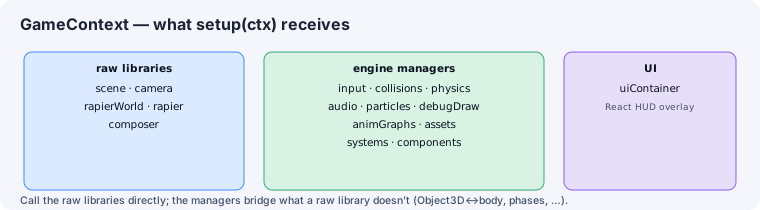
What’s in the context
Section titled “What’s in the context”| Group | Fields |
|---|---|
| Raw libraries | scene, camera, rapierWorld, rapier, composer |
| Engine managers | input, collisions, physics, audio, particles, debugDraw, assets, systems, components |
| Game root | game (optional — set by the host) |
ctx.game is the Game root: the fixed-step loop, the declaration-ordered world
registry, and the cross-root component query (game.queryByComponent(Cls, { worldId?, kind? })). UI is a separate declared React adapter root, not a field on a
Three.js setup context.
The raw libraries are the real Three.js / Rapier objects — call them directly. The managers bridge what a raw library doesn’t provide (the Object3D↔body map, system phases, the component manager, and so on).
The setup function
Section titled “The setup function”A game’s setup(ctx) registers systems / loads scenes / sets up state and returns a
GameCleanup ({ dispose() }). Every setup must return a dispose that removes
everything it created — the scene switcher calls it on change.
Runtime & session lifecycle
Section titled “Runtime & session lifecycle”createGameRuntime(...) boots the engine and returns a GameSession to control it:
stop()— full teardown.pause()/resume()— freeze / unfreeze the game’s simulation via the game-level play state (Game.play, D10). Only worlds markedpausablefreeze (apausable: falsemenu/HUD world keeps ticking), a paused world’s rendering keeps running (the screen never goes black), and its audio is silenced through its audio adapter — or reported loudly when it can’t be.timeScaleis untouched: it remains the separate “speed up / slow down” control.step()— advance a single fixed tick while paused.resize(width, height)— resize renderer + camera.- read-only getters for
scene,camera, andmounted(the underlying mounted game).
When launched from the editor’s play mode, setup also receives an EditorPreview
(scenePath, in-memory sceneData with unsaved edits, and the viewportCamera transform) so
the running game matches what you’re editing. The hosted (browser) build adds two routing
fields only its play entry reads: exampleId (dispatch a bundled example’s own setup) and
assetPrefix (play the open scene generically but resolve its relative assets from the
example’s staged /examples/<id>/ root — Track H).
Debug draw
Section titled “Debug draw”ctx.debugDraw (packages/engine/src/dev/debug-draw.ts) is an immediate-mode helper, cleared
each frame:
line(from, to, color?),sphere(center, radius?, color?),box(center, size, color?),arrow(origin, direction, length?, color?);clear()and avisibletoggle.
See also
Section titled “See also”- Entities & components — what
ctxis passed to. - The game loop & phases — when systems run.
- Tooling & Publishing — hot reload and the editor session.