
Audio
vgai audio is built on the Web Audio API via Three.js’s AudioListener. Setup
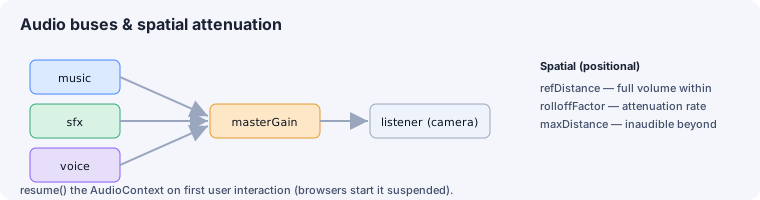
(packages/engine/src/setup/setup-audio.ts) creates the listener, a master gain, and three
category buses.
The audio context
Section titled “The audio context”The AudioContext provides:
listener— aTHREE.AudioListener(attached to the camera, so spatial audio is heard from the camera’s position).masterGain— the final gain node everything routes through.buses—music,sfx, andvoicegain nodes, each independently adjustable.resume()— call on the first user interaction; browsers start the audio context suspended until a gesture.
Sound sources
Section titled “Sound sources”An entity plays sound via the audio schema (packages/engine/src/adapter/system-adapter.ts):
| Field | Meaning |
|---|---|
src | path to a WAV / MP3 / OGG file |
spatial | enable 3D positional audio |
volume | 0–1 playback volume |
refDistance | distance at which attenuation begins (spatial only) |
rolloffFactor | how fast volume falls with distance (spatial only) |
maxDistance | distance beyond which it’s inaudible (spatial only) |
loop | loop the clip |
autoplay | start when the scene loads |
For spatial sounds, refDistance / rolloffFactor / maxDistance shape the falloff
curve; non-spatial sounds play at a constant volume (UI, music).
Procedural sound and music
Section titled “Procedural sound and music”The engine ships no sound generators and no Tone.js. Write procedural sound
with the Web Audio API directly, or add the music
capability for Tone.js:
vgai add musicThat copies src/lib/music/ into your project and adds tone to your
dependencies. It gives you the context bridge (so Tone and Three share one
AudioContext and one master gain), a transport locked to the canonical
AnimationClock, deterministic offline render for cinematics, and the
transport readout in the editor’s Audio panel. Scores are written with Tone’s
own API — new Tone.Synth(), Tone.getTransport() — and the copied source is
yours to edit.
Why it is not in the engine: the engine holds the editor’s adapter interfaces and nothing else, so what you must learn stays small and everything else is ordinary library code you can read in your own project.
One-shot voice limits and ducking
Section titled “One-shot voice limits and ducking”AudioBufferSourceNode and OscillatorNode are single-use. A rapid-fire
sound path therefore owns a bounded list of active voices, removes each voice
on ended, and stops the oldest before starting a new one when the list is
full. Do not build an engine sound manager around that rule. The readable
project implementation is
examples/first-person/src/lib/audio/sfx.ts (createGameSfx({ maxVoices })),
including truthful active-voice nodes in its registered Audio adapter.
Ducking is ordinary AudioParam automation on the bus that should yield. The
same file’s createGainDucker(context, gain, options) helper handles repeated
triggers by cancelling the previous automation, holding the current value,
and restoring the authored resting gain. The project still owns the real
GainNode and can continue using the Web Audio API directly.
See also
Section titled “See also”- Quick start: play a spatial sound — a focused walkthrough.