
CLI, SDK & scaffolding
Scaffolding new projects
Section titled “Scaffolding new projects”The one public entry point is @vgai/cli. Its create command copies the
selected adapter-root template, rewrites package.json, tsconfig.json,
vite.config.ts, and vgai.project.json, installs dependencies, and opens the
new project’s editor. Pass --example <id> to copy a worked game instead.
npx @vgai/cli@latest create my-game [target-dir]Choose the root composition explicitly when the default Three.js + React project is not what you want:
npx @vgai/cli@latest create my-game --template 2d # PixiJS + Reactnpx @vgai/cli@latest create my-game --template react # React onlyDriving the editor: the CLI
Section titled “Driving the editor: the CLI”The vgai CLI (packages/vgai-cli/src/index.ts) controls a running editor — useful for
scripting and automation:
| Area | Commands |
|---|---|
| Project | create, edit, open, project, projects, sessions, close, upgrade, validate |
| Drive it | eval '<js>' — the general door. eval --list enumerates everything in scope |
| Project tools | run <name> invokes a registered tool with validated JSON input |
| Play | play, stop, restart, status, console, screenshot [<target>] |
| Verify | validate, doctor, perf, conformance |
| Capabilities | add, remove, outdated |
| Ship | deploy, render-cinematic |
Selection, camera, panels, display toggles, and every game-specific command go
through vgai eval. A game names its own commands, so a fixed CLI vocabulary
cannot cover them:
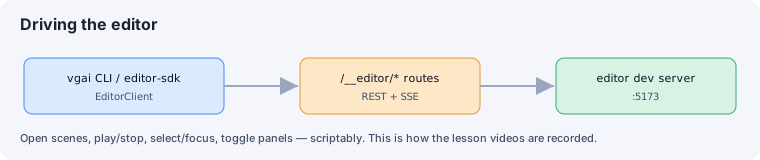
vgai eval --listvgai eval 'await editor.select("<id>")'vgai eval 'await game.commands()'Under the hood it targets the live editor session for the current project and
talks to its /__editor/* routes (REST + SSE). vgai edit reserves a stable
machine-local port for each project; pass --url only when targeting a session
explicitly.
Some commands work on project files rather than a live editor. vgai upgrade [folder]
re-syncs a scaffolded project after you update the vgai checkout (the engine is
source-linked, so engine code updates arrive instantly — upgrade handles the copied
half: template files and the manifest’s engine.version pin). It always reports first
(pin delta, per-file classification against the scaffold baseline, validation), updates
only files you never edited, shows diffs for the ones you did, and re-pins only when
validation passes — and if the project’s pin is ahead of the checkout’s engine (a
wrong-worktree tell), it refuses rather than silently downgrading, unless you pass
--force-downgrade. --report is report-only. See
Project lifecycle. vgai validate [folder] checks
a manifest in-process — no monorepo/editor/Vite needed beyond the checkout: it validates
vgai.project.json, confirms every declared entry/scene file exists, and
prints the engine pin (exit 0 valid, 1 invalid or missing file, 2 usage).
The editor SDK
Section titled “The editor SDK”@vgai/editor-sdk (packages/editor-sdk/src/) is the TypeScript client behind the control
surface — EditorClient with methods like play/stop/pause/resume/step,
select, focusEntity, viewPreset, panel toggles, getState, and waitForState. Use it
to build custom tooling.
See also
Section titled “See also”- HMR, storage & builds — hot reload and publishing.
- Get Started: install — first scaffold.