The animation graph
Three.js gives you an AnimationMixer that plays and crossfades clips. vgai adds the layer
it doesn’t have: a state machine with parameter-driven transitions and blend trees — the
AnimGraph (packages/engine/src/animation/anim-graph.ts).
What AnimGraph adds
Section titled “What AnimGraph adds”AnimGraph wraps a THREE.AnimationMixer. The mixer still does clip playback and blending;
the graph decides which clips play and at what weight:
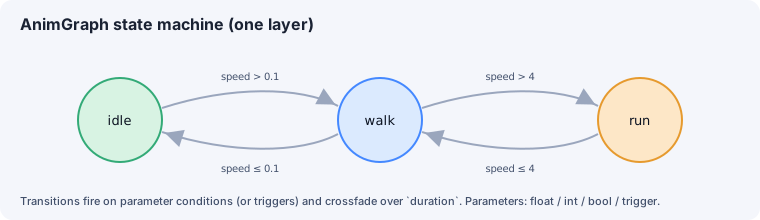
- Parameters — typed values you set from gameplay:
float,int,bool,trigger. - Layers — independent state machines blended together, each with a
blendModeofoverrideoradditiveand an optionalboneMask. - States — each plays a single
clip(withloop/speed) or a blend tree. - Transitions — move between states when conditions hold, crossfading over a
duration.
The API
Section titled “The API”graph.setParameter('speed', 5.0); // float | booleangraph.getParameter('speed');graph.trigger('jump'); // fire a trigger (auto-resets after it's consumed)graph.getCurrentState(layerIndex); // current state name (default layer 0)graph.update(dt); // call each frameTransitions in detail
Section titled “Transitions in detail”A transition has from (a state, or '*' for “any state”), to, an optional list of
conditions ({ param, op, value } with ops > < >= <= == != trigger), a
crossfade duration (seconds), and an optional exitTime (0–1 normalized clip time before
which it won’t fire).
The .animgraph.json format
Section titled “The .animgraph.json format”A graph is authored as { version, parameters, layers }
(packages/engine/src/animation/anim-graph-types.ts):
parameters: Record<string, { type, default }>layers: [{ name, blendMode?, weight?, boneMask?, defaultState, states, transitions }]states: Record<string, { clip?, loop?, speed?, blendTree? }>
The animation system
Section titled “The animation system”AnimGraph is a class instance (it wraps a mixer), so it lives in a Map<Object3D, AnimGraph> rather than a flat store. Register one system in the animation phase:
systems.add('animation', (dt) => animationSystem(animGraphs, dt));animationSystem (packages/engine/src/animation/anim-system.ts) simply calls
graph.update(dt) on every registered graph. GLTF-loaded scenes and scene-defined animations
register their graphs here automatically.
See also
Section titled “See also”- Blend trees — interpolating between clips.
- Inverse kinematics — procedural bone posing.
- The game loop & phases — the
animationphase.