Visual editing, components & source sync
This is the visual half: building and tuning UI by direct manipulation, reusing components, and round-tripping edits to source.
Visual editing
Section titled “Visual editing”A DOM selection overlay drives WYSIWYG editing of the UI tree: hover highlight, click / shift-click / marquee selection, drag-to-move (absolute nodes), resize handles, snap-to-grid, alignment/distribution on multi-select, and measurement guides. Editing follows a preview-vs-commit model — a drag previews live and commits one undo step on release. Hand-authored React components are instrumented with stable per-source-line ids (OIDs) so a selection maps back to its source location.
Components & reuse
Section titled “Components & reuse”A node of kind component renders a hand-authored React component, and UI subtrees can be saved
and reused as prefabs with per-instance overrides and exposed props/slots. Reuse nests
(components inside components) with cycle protection — each instance gets fresh stable ids.
Two-way source sync
Section titled “Two-way source sync”Visual edits to a hand-authored component’s styles write back to its .tsx — routed
losslessly to an inline style or a className as appropriate (including Tailwind
arbitrary-value classes like gap-[12px]). Expression-bound (dynamic) props are read-only
(flagged), so the editor never clobbers code it can’t safely rewrite. Structural source edits
(e.g. delete) are supported via the data path.
The UIAuthoringAdapter
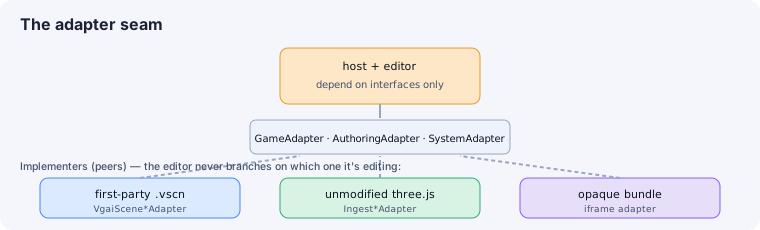
Section titled “The UIAuthoringAdapter”Crucially, the visual UI editor rides the same AuthoringAdapter seam as 3D scene editing
and ingest (packages/editor/src/authoring/ui-authoring-adapter.ts). It provides
hierarchy / selection / inspector / layout (anchor/flex — distinct from 3D transform) /
structure / persistence, so the editor’s panels work on UI without special-casing.
See also
Section titled “See also”- The adapter architecture — the shared
AuthoringAdapterseam. - UI in the scene graph · Styling & binding