Styling, theming & data binding
Styling & theming
Section titled “Styling & theming”A node carries a flat style bag whose values are literal CSS-ish values or theme-token
references of the form "$tokenName" resolved against the active theme. A theme defines
reusable tokens and named variants (inline on the canvas, or a standalone .uitheme.json),
with per-element overrides. Retheme live by changing a token.
Per-state styling layers hover / pressed / focus / disabled style overrides on top
of the base, with a CSS transition for animated state changes. Style primitives include fonts,
9-slice backgrounds (backgroundImage + sliceInset), and rich text.
Data binding
Section titled “Data binding”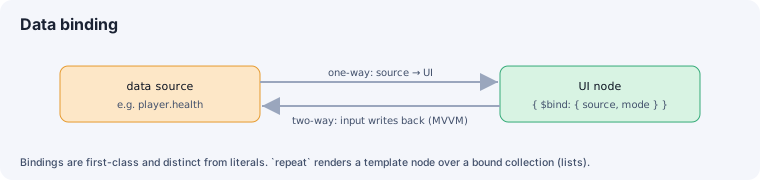
A prop value is either a literal or a binding wrapper { $bind: { source, mode } }
(packages/engine/src/scene/schema/ui.ts, resolved by ui-runtime/bindings.ts):
one-way(default) —source → UI.two-way(MVVM) — input controls also write back to the source.
Bindings are first-class and distinguishable from literals (the editor shows a literal vs.
~ source indicator). A node’s repeat renders a template node over a bound collection —
data-bound lists with per-item ids. Text can resolve localized string keys.
Interactive controls & events
Section titled “Interactive controls & events”button / toggle / slider / input / dropdown / progress controls wire events (e.g.
onClick / onChange) to game handlers. The UI overlay is pointer-events: none by default;
interactive controls (and nodes with events) opt back in to auto, so clicks fall through to
the 3D scene except where you want them. Controls are keyboard-focusable with a visible focus
state.
Responsive & multi-resolution
Section titled “Responsive & multi-resolution”A canvas can define scaling (a referenceWidth/referenceHeight design resolution with a
scale mode — a CanvasScaler analog) and aspect policies, and the editor previews preset
resolutions.
See also
Section titled “See also”- UI in the scene graph — the node tree + layout.
- Visual editing & source sync — author it visually.